Checking a Texas real estate agent’s license takes less than two minutes. All you need is the agent’s name or license number. The Texas Real Estate Commission keeps a free, public database of every license holder in the state.
This post shows you exactly how to run a TREC license lookup. It covers what the results mean and what to do if something looks off.
What Is a TREC License Lookup?
A TREC license lookup is a free search tool on the Texas Real Estate Commission website. It lets anyone confirm whether a Texas real estate professional holds a valid license.
TREC stands for the Texas Real Estate Commission. It is the state agency that licenses and regulates real estate professionals in Texas. TREC approves license applications and renewals. It sets the rules license holders must follow. It also handles investigations when those rules are broken.
The License Holder Search is TREC’s public database. Anyone can view license records there for free.
The database covers:
- Sales agents
- Brokers
- Inspectors
- Appraisers
- Easement and right-of-way agents
- Appraisal management companies
TREC updates these records daily. It is the most reliable source for verifying a Texas real estate license.
How to Run a TREC License Search
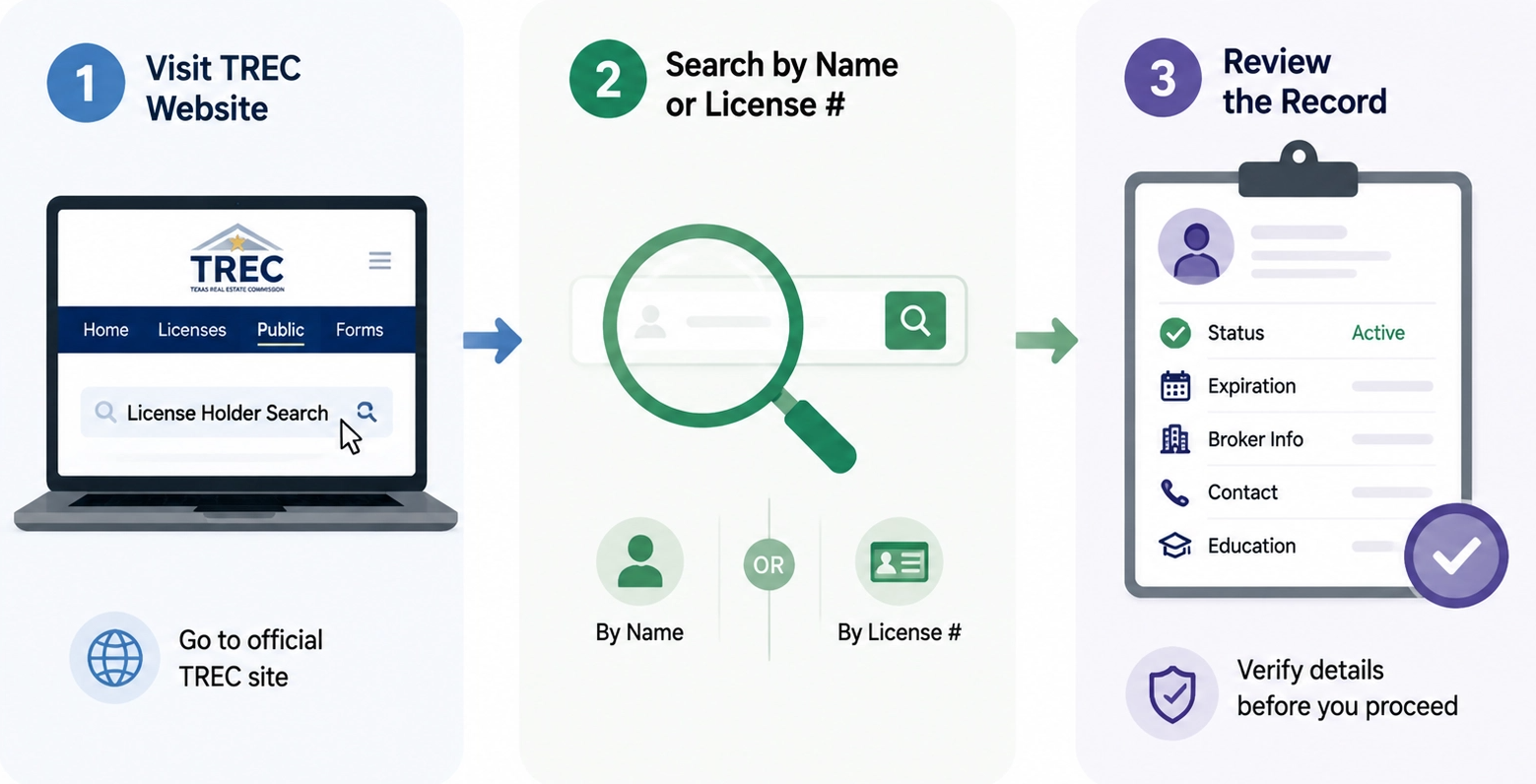
The search takes under two minutes. Here is how to do it.
Step 1: Go to the Official TREC Website
Go to trec.texas.gov. Look for the “License Holder Search” option under the “Public” tab. Click it to open the search page.
Always use the official TREC site. Third-party websites may not reflect recent renewals or status changes.
Step 2: Enter a Name or License Number
TREC gives you two ways to search.
Search by name when you know the professional’s name but not their license number. Use a partial name if the exact spelling is unclear. Add more detail if too many results appear.
Search by license number when you have it. Each license number belongs to only one person. This removes any confusion when two professionals share the same name.
Step 3: Review the Record
Once you find the right record, check these details:
- License holder name
- License number
- License type
- Current license status
- Expiration date
- Sponsoring broker information
- Email address and phone number
- Continuing education history
Confirm all details match the professional you are researching. Do this before signing any agreement.
What Does a TREC License Record Show?
Here is a full breakdown of what appears in a TREC license record.
| Field | What It Shows |
|---|---|
| License Holder Name | The name on file with TREC |
| License Number | Unique identification number assigned to the professional |
| License Type | Whether the person is a sales agent, broker, inspector, or another license type |
| License Status | Whether the license is active, inactive, or expired |
| Expiration Date | When renewal is required |
| Sponsoring Broker | The broker connected with a sales agent |
| Contact Information | Email address and phone number on file |
| Education History | Continuing education courses completed, school name, and completion dates |
The CE records are especially useful for agents checking their own files. A discrepancy caught early is far easier to fix than one found at renewal time.
What License Types Does TREC Cover?
The license type tells you what a professional is legally allowed to do. Here are the main types.
Sales Agent: A sales agent helps clients buy, sell, or lease property. In Texas, a sales agent must always work under a licensed sponsoring broker. They cannot practice independently.
Broker: A broker can work independently or own a brokerage. Brokers may also supervise sales agents. The requirements to become a broker are more extensive than for a sales agent.
Inspector: A licensed inspector carries out property inspections under Texas requirements.
Appraiser: A licensed appraiser determines property value. TREC oversees appraiser licensing in Texas.
Always confirm the license type matches the service the professional is offering you.
What Does License Status Mean in Texas?
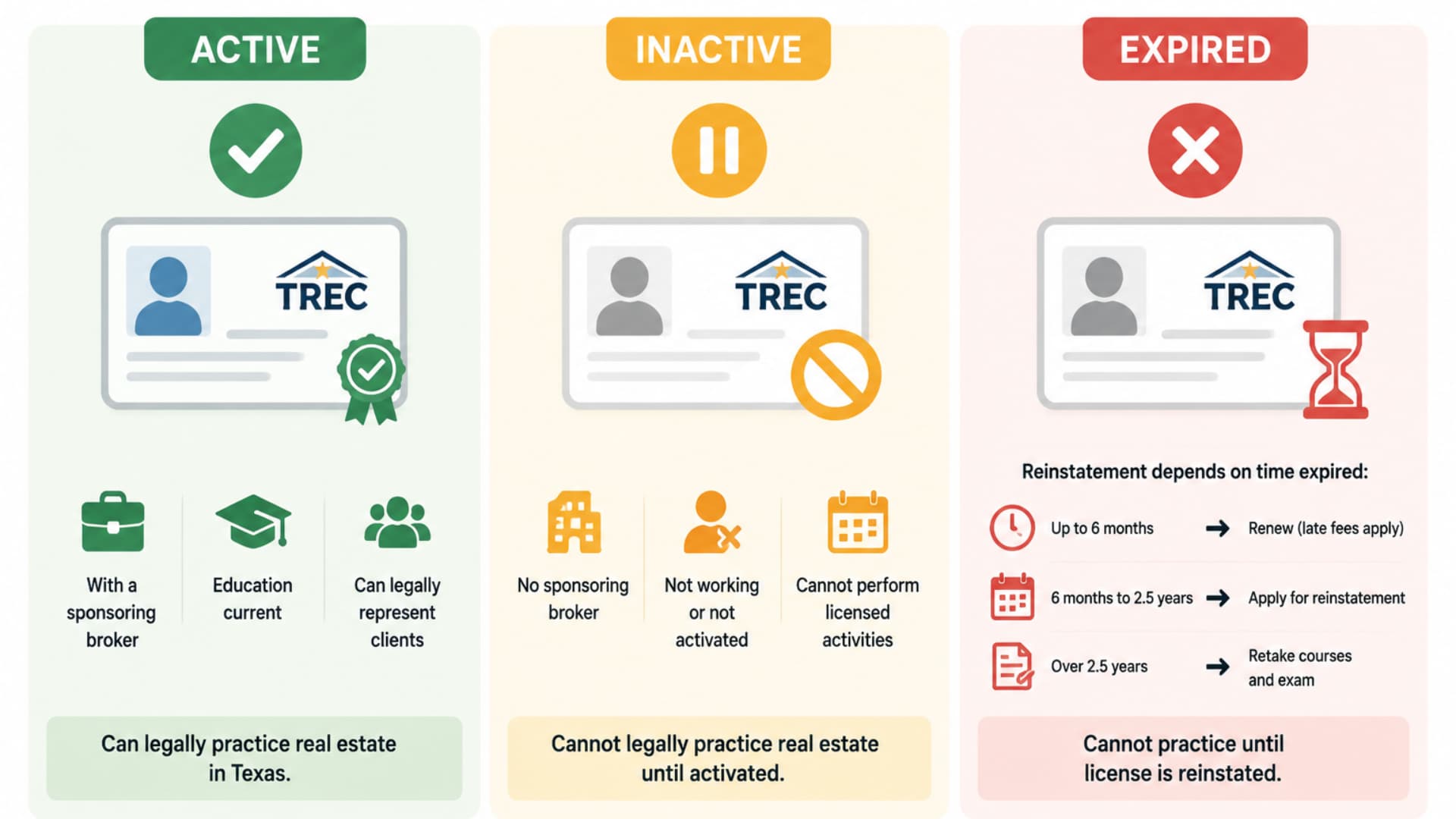
License status is the most important detail to check. It tells you whether a professional can legally practice real estate right now.
Active License
An active license means the professional is registered with a sponsoring broker. It also means they are current on all required continuing education. Only agents with an active license can legally represent clients in Texas.
Inactive License
An inactive license exists on record, but the holder cannot perform licensed activities. An agent with an inactive license cannot legally represent you in a real estate transaction.
Inactive status is common in these situations:
- A sales agent does not have a sponsoring broker
- An agent chooses to keep their license but is not actively working
- A newly issued license has not yet been activated through broker sponsorship
To move from inactive to active, an agent must register with a sponsoring broker. They must also complete any required continuing education from the inactive period.
Expired License
An expired license means the holder missed their renewal deadline. They cannot practice real estate until the license is reinstated.
Reinstatement depends on how long the license has been expired:
- Up to six months past expiration: The holder can still renew, though late fees apply.
- Six months to two and a half years past expiration: The holder must apply for reinstatement.
- More than two and a half years past expiration: The holder must retake pre-licensing education. They must also retake the state exam.
Who Uses the TREC License Lookup?
Three groups rely on this tool regularly.
Home buyers and sellers use it before signing with an agent. They can confirm the agent holds a current, active license. They can also verify the license type matches the service offered. The name on the record should match the person they are meeting.
Real estate brokerages check TREC records during agent onboarding, compliance checks, and sponsorship verification. Regular checks help brokerages keep their records current and accurate.
License holders themselves should check their own records at least once a year. This confirms the public record is correct. It also verifies CE history matches what they have completed and that the renewal date is on track.
TREC License Lookup vs. REALM Portal
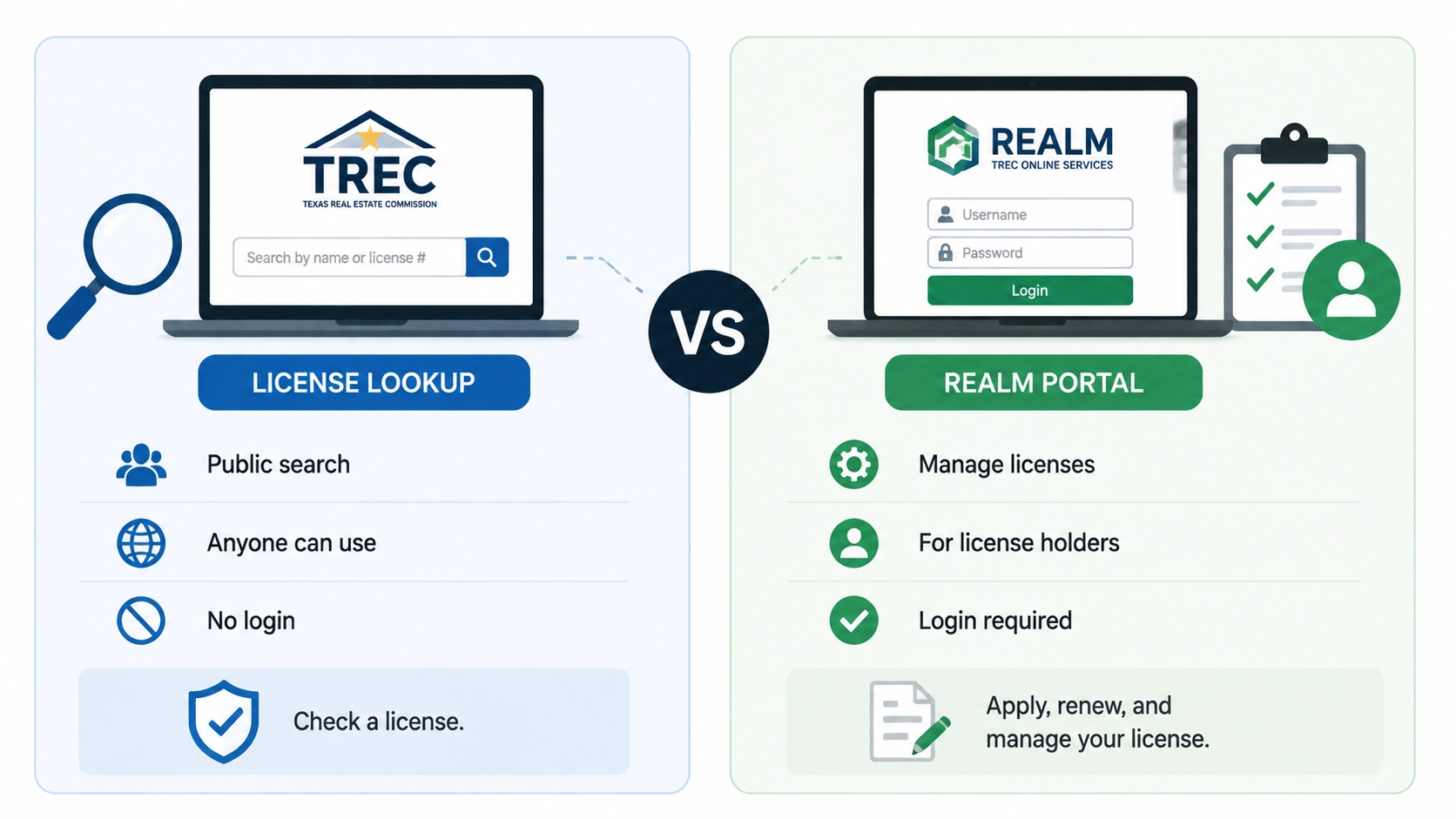
These two tools are often confused. They serve completely different functions.
| Feature | TREC License Lookup | REALM Portal |
|---|---|---|
| Main Purpose | Public license search | License management services |
| Primary Users | Buyers, sellers, businesses, and agents checking records | License holders and applicants |
| Search Public Records | Yes | Not the main purpose |
| Manage Applications and Renewals | No | Yes |
| Login Required | No | Yes |
Use the License Lookup to verify a professional’s record. Use the REALM Portal to apply for a license, renew it, or manage your own account with TREC.
What to Check Before Hiring a Texas Real Estate Agent
A TREC license lookup is a good starting point. Before hiring an agent, check these five things:
- The license is active, not inactive or expired
- The license type matches the service being offered
- The sponsoring broker information is current
- The name on the record matches the person you are meeting
- The full record shows no disciplinary history
Licensing confirms legal status. It does not replace checking an agent’s market knowledge, track record, and communication style. Both matter when you are making a major property decision.
Common Search Problems and How to Fix Them
The person does not appear in results. Try searching by license number if you have it. The name may be spelled differently in the TREC record. A recently approved license may not have updated yet. Try a partial name to widen results.
Too many results appear. Narrow the search by adding a city or brokerage name. Switch to a license number search if available.
The information looks incorrect. TREC shows what is currently on file. If a record looks wrong, contact TREC directly to ask about a correction.
Frequently Asked Questions
Is the TREC license lookup free?
Yes. The public TREC License Holder Search requires no account and no fee.
How do I find a Texas real estate agent’s license number?
Search the agent’s name in the TREC License Holder Search. Agents must also display their license number on all marketing materials.
Can I see if an agent has disciplinary actions on their record?
Yes. TREC’s license record includes disciplinary history. Check the full record for any actions taken against the license holder.
How often does TREC update its records?
TREC updates license records daily. Renewals and status changes typically appear within one business day.
What happens if an agent’s license is expired?
An expired license holder cannot practice real estate in Texas. Reinstatement rules depend on how long the license has been expired. Fees and re-education requirements may apply.
Verify Before You Sign
A TREC license lookup is the fastest way to confirm a Texas real estate professional’s credentials. The search is free, takes under two minutes, and requires no account.
Before working with any Texas real estate professional, confirm their license is active. Check that the license type matches the service they provide. Make sure the name on the record matches the person in front of you.
Running a TREC license lookup before signing takes less time than a phone call. It gives you a reliable, official answer every time.